
Quick Steps
- 1
Audit your current technology and future headcount
Document every piece of technology in your office: network equipment, computers, phones, printers, conference room setups, and software subscriptions. Map who uses what and identify gaps. Then project your headcount growth over 18 to 24 months. Your infrastructure needs to support where you are going, not just where you are today.
- 2
Design your network infrastructure
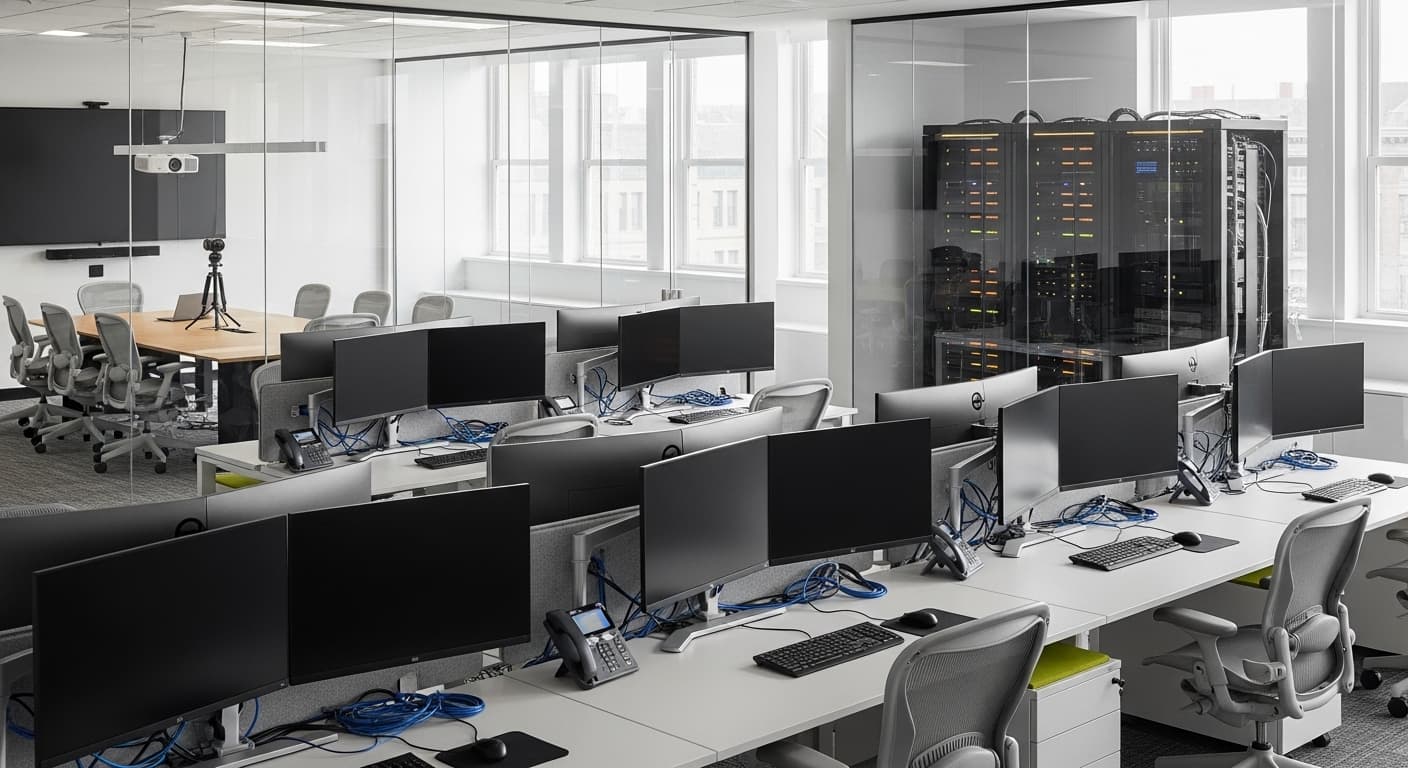
Plan your wired and wireless network to support your projected headcount plus 30 percent buffer. Install business-grade access points with centralized management, run structured Cat6a cabling to every workstation and conference room, and deploy a managed switch with enough ports for growth. Segment your network into at least three VLANs: corporate devices, guest WiFi, and IoT or AV equipment.
- 3
Select your cloud vs on-premise mix
For most teams under 50 people, a cloud-first strategy is the right call. Use Microsoft 365 or Google Workspace for productivity, cloud-based VoIP for phones, and SaaS applications for line-of-business functions. Keep a small on-premise server only if you have specific latency, compliance, or data sovereignty requirements that cloud cannot satisfy.
- 4
Build out conference room technology
Equip each meeting room with a dedicated video conferencing system, not a laptop on a cart. Install a quality USB conference camera with auto-framing, a ceiling microphone array or tabletop speakerphone, a large-format display or interactive whiteboard, and a one-touch join system like Microsoft Teams Rooms or Zoom Rooms. Test audio quality from every seat before signing off.
- 5
Implement baseline cybersecurity
Deploy endpoint protection on every device, enable multi-factor authentication on all business accounts, configure a next-generation firewall with intrusion detection, set up automated patching for operating systems and applications, and establish a password manager for the team. These five measures block over 90 percent of common attack vectors for small offices.
- 6
Establish your IT support model and lifecycle plan
Decide whether you need an in-house IT hire (typically justified at 40 or more employees), a managed service provider (best for 10 to 40 person teams), or a hybrid model. Create a hardware lifecycle plan that replaces laptops every 3 to 4 years and network equipment every 5 to 7 years. Budget 3 to 5 percent of annual revenue for technology, including capital and operating expenses.
Why Office Technology Decisions Compound
Technology decisions in a growing office are not isolated purchases. They are architectural choices that compound over time. The WiFi access point you buy today determines whether your team of 30 will have reliable video calls next year. The network switch you install now determines whether adding 15 new hires requires a simple port connection or a full infrastructure overhaul.
We see this pattern constantly with teams in the 10 to 50 person range. They outgrow their original setup around 15 to 20 people, but instead of redesigning the infrastructure, they patch it. They add a consumer-grade WiFi extender when signal drops. They buy a second router when the first runs out of ports. They sign up for three different video conferencing platforms because nobody standardized on one.
Each patch creates a new failure point. By the time the team hits 30 people, they are dealing with daily WiFi drops during video calls, a tangle of consumer hardware that nobody fully understands, and security gaps they do not even know about. The cost to fix it retroactively is typically 2 to 3 times what a planned build would have cost. Office technology is one of those rare investments where spending more upfront genuinely saves money downstream, but only if you spend it on the right things, architected with growth in mind.
Network Infrastructure: The Foundation Everything Else Depends On
Your network is the single most critical piece of office technology, and it is the one most teams underinvest in. Every application, every video call, every cloud service, and every connected device depends on a reliable, fast network. When your network is solid, everything else works. When it is not, everything else suffers.
For a 10 to 50 person office, the network architecture should include a business-grade firewall and router with gigabit throughput and VPN capability, a managed PoE switch (or switches) with enough ports for current needs plus 30 percent growth, structured Cat6a cabling to every workstation and conference room, and enterprise-grade WiFi access points with centralized management.
The WiFi planning deserves special attention. Consumer routers and mesh systems are not designed for office density. When 20 people are on video calls simultaneously, consumer hardware chokes. Enterprise access points from vendors like Ubiquiti, Meraki, or Aruba are designed for exactly this scenario. Plan one access point per 1,500 to 2,000 square feet of office space, mounted on the ceiling, with dedicated 5GHz and 6GHz bands for high-bandwidth devices. A site survey by an IT professional costs $500 to $1,500 and prevents the $5,000 mistake of putting access points in the wrong locations.
Conference Room Technology That Actually Works
Conference room technology is where most offices visibly fail. The symptoms are universal: meetings start 5 minutes late because someone cannot connect their laptop, remote participants complain they cannot hear, the camera captures the ceiling instead of the speaker, and the screen sharing is a 50/50 proposition.
The solution is dedicated, always-on conference room systems, not a laptop plugged into a TV. A well-equipped meeting room for 6 to 12 people should include a 55 to 75 inch commercial display or interactive whiteboard, a PTZ camera with auto-framing (Logitech Rally, Poly Studio, or equivalent), a ceiling-mounted microphone array for full-room coverage, a tabletop controller or touch panel for one-touch meeting join, and hardwired Ethernet for the system, never WiFi for conference room video.
The total cost for a properly equipped medium conference room ranges from $3,000 to $8,000 depending on the platform and display choice. That sounds like a lot until you calculate the alternative: 10 employees wasting 10 minutes per meeting troubleshooting AV issues, in 5 meetings per day, costs approximately $40,000 per year in lost productivity. Beyond dollars, poor conference room tech creates a perception problem with clients and recruits. When a prospect joins a video call and the audio echoes, the camera angle is unflattering, and the presenter fumbles with screen sharing for two minutes, that shapes their impression of your professionalism.
Cloud vs On-Premise: Making the Right Call
The cloud vs on-premise debate is largely settled for teams under 50 people: cloud wins for nearly every scenario. The economics are compelling: no capital expenditure on servers, no cooling or power requirements, no need for specialized IT staff to maintain hardware, and built-in redundancy that most small offices could never replicate on-premise.
A cloud-first stack for a growing team typically looks like this: Microsoft 365 or Google Workspace for email, calendars, documents, and collaboration at $12 to $22 per user per month. A cloud-based VoIP phone system like RingCentral, 8x8, or Microsoft Teams Phone at $20 to $35 per user per month. Cloud-based line-of-business applications (your CRM, project management, accounting, and industry-specific tools) typically $50 to $200 per user per month combined. And cloud backup and security tools at $5 to $15 per user per month.
The total cloud stack for a 25-person team runs approximately $2,500 to $6,000 per month, less than the cost of a single IT hire to maintain on-premise infrastructure. The exceptions to cloud-first are specific and narrow: regulated industries with data sovereignty requirements (certain healthcare and financial services), businesses with latency-sensitive applications that require local processing, and organizations with existing capital investments in server infrastructure that still have useful life remaining. If none of those apply, go cloud-first and do not look back.
Cybersecurity Basics Every Growing Office Needs
Small businesses are not too small to be targeted. According to Verizon's Data Breach Investigations Report, 43 percent of cyberattacks target small businesses, and the average cost of a breach for companies under 500 employees is $3.31 million. You do not need an enterprise security operation, but you do need the basics.
The foundational cybersecurity stack for a 10 to 50 person office includes five layers. First, endpoint protection: modern antivirus and endpoint detection on every laptop and workstation, centrally managed so you can see the security status of every device. Second, multi-factor authentication on every business account without exception. MFA alone blocks 99.9 percent of automated account compromise attacks. Third, a next-generation firewall with intrusion detection and prevention at your network perimeter. Fourth, automated patch management that keeps operating systems, browsers, and applications updated without depending on individual employees to click update buttons. Fifth, a business-grade password manager deployed to every team member so passwords are unique, complex, and securely shared when necessary.
Beyond tools, you need a security awareness baseline. Conduct a 30-minute security training quarterly, run simulated phishing campaigns twice per year, and establish a clear incident response procedure so your team knows who to contact and what to do when something suspicious happens. The total investment for this security foundation runs $15 to $40 per user per month for tooling, plus $1,000 to $3,000 annually for training and testing.
Hardware Lifecycle and Budget Planning
Technology does not age gracefully. A laptop that was fast on day one will be frustratingly slow by year four, and a WiFi access point from 2021 was not designed for the device density and bandwidth demands of 2026. Planning for hardware replacement is not optional. It is how you avoid surprise capital expenditures that blow your quarterly budget.
The standard lifecycle for office hardware is 3 to 4 years for laptops and desktops: performance degradation and security update compatibility both become problems beyond this window. Monitors and peripherals last 5 to 7 years. Network infrastructure (switches, access points, firewalls) should be refreshed every 5 to 7 years or when the device can no longer receive firmware security updates. Conference room AV equipment lasts 4 to 6 years before compatibility and performance gaps justify replacement.
For budgeting, the industry benchmark is 3 to 5 percent of annual revenue for total technology spend, including hardware, software, cloud services, and IT support. A 25-person company with $3 million in revenue should budget $90,000 to $150,000 annually for technology. That breaks down roughly to 35 percent for cloud software and subscriptions, 25 percent for hardware purchases and replacements, 25 percent for IT support (managed services or internal staff), and 15 percent for projects, upgrades, and contingency. Spread hardware purchases across quarters to avoid a single large capital hit. If you bought 25 laptops at the same time, you will need to replace 25 laptops at the same time. Stagger purchases by department or team to create a rolling replacement cycle.
Frequently Asked Questions
Ready to Take the Next Step?
Let's discuss how TwoChi can help your business grow.
Get a Workspace Technology AssessmentMore from Physical Infrastructure
Commercial Property Management KPIs: What to Track and Why
You cannot manage what you do not measure, and in commercial property management, what you fail to measure costs you tenants, revenue, and asset value. Here are the KPIs that separate professionally managed portfolios from reactive ones, and how tracking them transformed one property group's performance.
ReadHow to Reduce Commercial Property Vacancy Rates
Every month a commercial space sits vacant costs you money: not just lost rent, but maintenance, insurance, and depreciation. Here are the strategies that consistently reduce vacancy rates and keep properties fully leased.
Read